

The nightly rate isn’t the full amount you agree to pay. Avoiding hidden fees in vacation rentals starts with comparing the total shown before booking and reading the terms that affect what you may owe or get back. Check how the price is calculated, cancellation deadlines, deposit return conditions, and whether the length of your stay changes the rate or charges.
It’s easy to focus on an appealing nightly price when you’re planning a getaway. But the clearest comparison is the full booking total alongside its terms. A lower starting price may not be the best value if the final amount or cancellation policy doesn’t suit your plans.
This guide explains what to check in online pricing, how cancellation timing can affect a refund, what deposit return conditions mean, and why stay length matters. Use these practical checks to compare rentals and understand your total commitment before booking.
Key Takeaways
- Compare the full amount shown at checkout, not just the advertised nightly rate.
- Review cancellation deadlines and deposit return conditions before booking so you understand what could affect a refund.
- Compare the total for your full stay, since rental length can change how pricing is presented.
- Look at cleaning and service charges separately to see how they contribute to the booking total.
- Account for applicable taxes and local lodging charges when comparing rentals in different destinations.
Advance online rental pricing
The first price you see may show only the nightly rate, not the full reservation total. Review the itemized amount and booking terms before committing.
For a quick overview of booking costs, watch this video:
Taxes and Local Lodging Fees
Taxes and local lodging fees vary by destination, and the initial rate may not include every charge. Open the full price breakdown for your selected dates, then distinguish taxes and lodging charges from the nightly rate. Compare the same dates and guest count across listings, since changing either can update the total. This gives you a clearer basis for comparing stays in the same area.
Cleaning and Service Fee Disclosure
On Airbnb, Vrbo, and other booking sites, check the itemized total for cleaning charges, service fees, taxes, and accommodation costs. These may appear separately from the nightly rate, so review the complete reservation amount before proceeding. Compare the total for your full stay, not an individual fee, and make sure the dates and guest count match across listings.
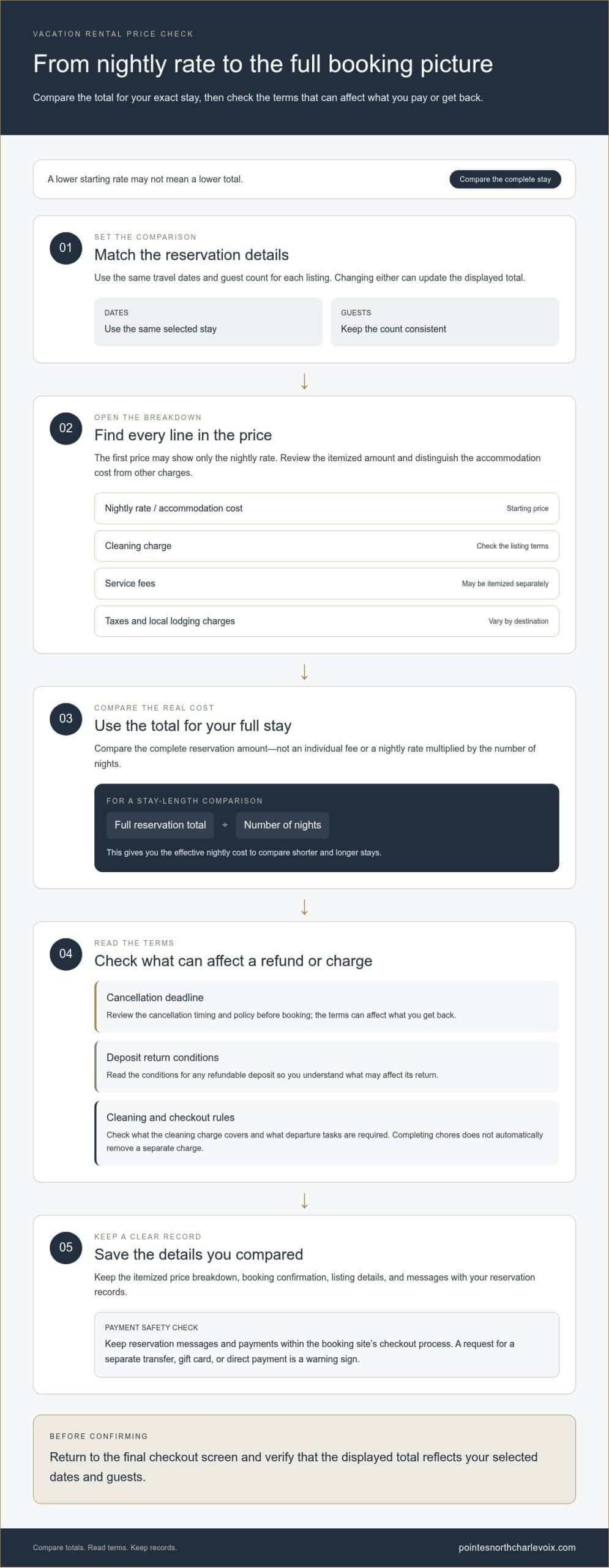
Use identical reservation details when comparing options. Enter your travel dates and guest count, open each listing’s price breakdown, and note every line contributing to the total. A lower nightly rate can look appealing even when a separate charge changes the overall cost. Compare the full amount for your planned stay rather than multiplying one night’s price by the number of nights.
How can you verify a listing and avoid off-platform payment scams? Review the listing details and guest feedback on the booking site, and keep reservation messages and payments within its checkout process. Treat requests for a separate transfer, gift card, or direct payment as a warning sign.
- Confirm the listing address, amenities, dates, and house rules match your plans.
- Read the cancellation terms and the conditions for any refundable deposit.
- Save the itemized price breakdown and booking confirmation for your records.
A practical approach to avoiding hidden fees in vacation rentals is to compare complete totals and booking terms side by side. For your stay, review the vacation rental options as part of your comparison. Before confirming any reservation, return to the final checkout screen and make sure the displayed total reflects your selected dates and guests.
Rental return conditions and possible charges
Before booking, compare the checkout rules with the listing’s stated conditions. Cleaning expectations, deposit terms, and charges for extra work can affect your final cost.
Read the full policy before reserving, then save a copy with your confirmation. This gives you a clear reference if a later charge differs from the disclosed terms.
Cleaning Fee Negotiation and Refunds
Are vacation rental cleaning fees negotiable or refundable? That depends on the host’s terms and the booking platform’s policy. A cleaning charge may still apply if you leave the property tidy, while a refund depends on the specific cancellation or adjustment terms. Compare the cleaning description with the checkout list, and keep both with your reservation records.
If a charge is unclear, message the host through the booking platform before reserving. Ask what the cleaning fee covers and whether it changes if you complete listed tasks, such as removing trash or washing dishes. Keep the written reply as a record of the terms. Don’t assume that completing chores automatically removes a separate charge.
Responding to Undisclosed Fees
What steps can you take if a host charges an undisclosed fee? Save the listing, checkout breakdown, confirmation, and messages, then compare them with the new charge. Ask the host through the platform’s messaging system to identify where the charge appeared in the original terms. If the explanation conflicts with your records, contact the booking platform through the reservation’s support options.
Keep the conversation factual. Point to the confirmation total and the exact line where the later charge first appeared. Request an explanation or correction in writing, and avoid paying through a separate channel while the issue remains unresolved. A dated screenshot can help preserve what the listing and checkout page showed when you booked.
Rental charges depend on the property’s stated conditions, the cleaning work involved, and your reservation details. The booking quote shows the amount for your stay, so compare it with the listing before confirming.
Return conditions may also explain how to leave the space, where to put keys, and how to report damage. Follow each instruction. If the checkout list asks you to start a dishwasher, place used towels in a designated spot, or secure a key, complete those steps before leaving. When useful, photograph the space and returned keys, and keep the images with your reservation records.
Distinguish routine checkout tasks from claims involving damage or extra cleaning. Collecting rubbish is different from a charge for a reported spill or broken item. If a host raises a concern after departure, compare the claim with the listing rules, your messages, and any arrival or departure photos. These records help you explain what happened and keep the discussion focused on the documented terms.
For a clearer booking, review all return instructions before paying and retain the final checkout breakdown. Written terms make it easier to understand what departure requires and how any later charge relates to your agreement—a diligence that applies across all travel reservations, whether evaluating a holiday home or arranging high-end transport with Delta Rentals Dubai.
Single-day and multi-day rental pricing
A rental’s daily rate doesn’t always show how the length of your stay affects the total. Compare the same property, guest count, and dates across different stay lengths before choosing.
Start with the full reservation total for your exact dates, then divide it by the number of nights to calculate the effective nightly cost. This helps you compare shorter and longer stays, especially when fixed charges apply once per reservation. Don’t assume the nightly rate multiplied by the number of nights equals the final amount.
Many vacation rental platforms initially display prices calculated for single-day rentals. This illustrates why you should check what a displayed rate covers before applying it to a longer booking. A one-day rate may not explain the cost of an extended rental. For a vacation stay, use the booking page’s total for the full date range rather than projecting from a single night.
Compare date ranges carefully. Changing your arrival or departure date can change which nights are included, and weekday and weekend rates may differ. Use the same calendar dates when comparing properties. For a longer trip, check the total for each possible departure date rather than assuming every additional night costs the same.
Fixed charges have a greater effect on the per-night average of a short booking because they’re spread across fewer nights. For example, a one-time cleaning charge affects the average more on a brief stay than on a longer one. That doesn’t automatically make the longer booking better value. Compare complete totals and decide whether the extra nights suit your plans.
Use this simple comparison for each option:
- Enter the same arrival date, departure date, and guest count.
- Record the full displayed total for each stay length.
- Divide each total by the number of nights to compare effective nightly cost.
- Review which charges apply once and which vary with the stay.
Compare a short weekend booking with a longer stay that includes those same nights. The longer option may lower the average per night while increasing your total commitment. Consider whether the extra nights add useful time at your destination. Choose based on the overall cost and value of the trip, not the lowest figure shown for one night.
For any rental, the total depends on your dates, stay length, property terms, and applicable charges. The quote should show the amount for your booking before you complete the reservation.
Before paying, return to the booking summary and confirm that the dates match your plans. Check the total after any change, since even a small adjustment can alter which nights are included. This final review helps you compare the real cost of each option and choose a stay that fits your itinerary and budget.
How do Airbnb, Vrbo, and other booking sites disclose cleaning and service fees?
Airbnb, Vrbo, and other booking sites show rental costs in listing details and reservation price breakdowns. Layouts vary, so follow the displayed total through checkout. Look for separate lines for the nightly rate, cleaning, service charges, taxes, and other disclosed costs. A headline rate alone isn’t enough to compare two stays.
On Airbnb, open the listing’s price details for your selected dates and guest count. On Vrbo, review the quote or checkout summary before confirming. In either case, note whether cleaning and service charges appear separately or in a combined amount. If the display changes as you proceed, use the latest total shown before payment.
Read each price breakdown
Enter your dates and guest count, then inspect each cost label. A cleaning charge is different from a booking platform’s service charge, even if both appear near the nightly rate. Taxes may also be listed separately. Record the labels and total for each listing instead of comparing one site’s nightly figure with another’s final amount.
For example, enter the same weekend dates and guest count on Airbnb and Vrbo. Compare the complete checkout totals and identify the lines for cleaning, platform service, taxes, and accommodation. If one total includes a charge that another site lists separately, compare the final amounts rather than treating a difference in presentation as a difference in price.
Track changes before payment
Booking screens can recalculate when you change dates, guests, or stay length. After each adjustment, review the new breakdown on Airbnb, Vrbo, or another platform. Don’t rely on an earlier screenshot if your reservation details have changed. Check the total again on the final payment screen and keep the confirmation.
Distinguish a fee disclosed during checkout from a request made outside the platform. A charge described in the listing or itemized before payment differs from a new amount requested in a separate message. Keep communications and payments within the booking platform, and save the listing terms and checkout details for your reservation.
Keep a simple comparison record for each option: dates, guest count, total, and names of the charges. This makes Airbnb’s display easier to compare with Vrbo’s, even when their layouts differ. If a line is unclear, review the listing terms and platform explanation before booking. A careful final check helps you understand what the amount covers and spot changes before confirming.
What taxes and local lodging fees apply to vacation rentals in the United States?
Vacation rental taxes depend on the destination and the charges shown for your stay. A booking in one city may display taxes differently from a similar reservation elsewhere. Compare the complete checkout breakdown for each location, separating taxes or lodging charges from rent, cleaning, and platform service costs. Don’t assume two listings present costs in the same way.
Start with the destination. Enter your exact dates and guest count, then open the final price details. Look for labels such as taxes, lodging tax, occupancy tax, or local fee. These labels help identify tax-related lines, but don’t explain by themselves how a charge was calculated. Compare the lines with your reservation details and the total shown before payment.
The nightly rate is only one part of the comparison. Two rentals in different towns, for example, may show similar nightly amounts but present local charges differently at checkout. Record each line from the final summary instead of estimating the tax from the rate. If a fee appears only after you select dates, note when it enters the calculation and whether the guest count or stay length changed.
Use this review process before confirming a booking:
- Set the same dates and guest count for every rental you compare.
- Open the final price details and note taxes and lodging charges separately.
- Compare the charge labels with the listing’s booking terms.
- Revisit the total after changing dates, guests, or the property location.
Local lodging charges may be listed separately or grouped with other taxes. A combined label can make costs harder to compare, so review the complete summary instead of relying on one category. If one checkout page groups charges and another itemizes them, compare the final amounts and save both breakdowns with your reservation confirmation.
Destination also matters when an itinerary includes overnight stays in multiple towns, since tax and lodging charges may be displayed differently. Review each reservation separately rather than applying one location’s breakdown to another. This is useful for trips with separate bookings, such as a few nights in one town followed by a stay elsewhere.
Before paying, save the listing details and checkout summary for each rental. If a charge is unclear, compare its label with the booking terms and final total. This review helps you understand the displayed tax and lodging costs, compare locations on equal terms, and keep a record of what the reservation showed when you booked.
Pointes North Inn: One Bedroom Suite
Pointes North Inn’s One Bedroom Suite is an option for travelers comparing vacation rentals and booking costs. After reviewing how online pricing, cancellation terms, and lodging charges affect your budget, compare the suite’s reservation details with your dates and needs. Other accommodations include a Two Bedroom Suite, King Suite with Kitchenette, and Pet Friendly Condominium.
Before booking, review the selected dates, occupancy details, and complete terms so you understand the reservation. A clear comparison helps you decide whether a condominium-suite hotel suits your plans better than another rental format.
Explore the vacation rental options at Pointes North Inn, or contact the inn to learn more.
Make room for a more considered getaway
A well-planned stay offers more than a clear booking total. It lets you enjoy your destination without wondering whether your accommodation fits your plans. Use your budget to guide the kind of retreat you want, whether that means a quiet reset, time together, or a change of scenery. The right choice is one that feels comfortable before you arrive and suits how you want to spend your time away.
That’s the value of avoiding hidden fees in vacation rentals: you can book with intention and focus on the experience ahead. When extra savings open up room for special adventures like private boat charters, resources from Happiest Ours can help you plan what to expect and wear on the water. Use the details you’ve reviewed to choose a stay that fits your plans and leaves room to enjoy your time away.
Contact Pointes North Inn today and start looking forward to a more relaxing getaway.
Frequently Asked Questions
What fees can vacation rental hosts charge beyond the nightly rate?
Beyond the nightly rate, a listing may include cleaning and platform service charges, applicable taxes or local lodging fees, and optional costs tied to disclosed conditions, such as a pet or additional guest. A refundable deposit differs from a charge because it may be returned under stated conditions. Read each fee label and related policy, then compare them with the listing’s inclusions.
How can I see the total cost of a vacation rental before booking?
After entering your dates and guest count, use the booking site’s final review screen. Confirm the dates and occupancy match your plans, then check the full amount and each listed component before paying. Save the confirmation and price details. If the amount changes before booking, pause and compare the updated summary with your reservation details.
How can I avoid duplicate or unreasonable fees when booking a vacation rental?
Compare fee labels and descriptions to see whether separate charges appear to cover the same service. A cleaning charge and a checkout task list, for instance, aren’t automatically duplicates, but the listing should explain what each covers. Keep the listing and payment summary, and ask for an itemized explanation through the booking platform if a charge is unclear. Base your decision on the written terms, not assumptions.
What should I check in a vacation rental listing and rental agreement before paying?
Check that the rental agreement matches the listing’s dates, guest count, amenities, house rules, and cancellation terms. Review deposit return conditions, checkout instructions, and charges related to pets, extra guests, or reported damage. Confirm that the property name and payment recipient match the booking details. Save the agreement and listing before paying, so you can refer to the exact terms you accepted.